| Time & Place: |
Ref No. 39827: Tuesday & Thursday, 5:30 – 6:45 PM,
via Zoom on-line meetings
|
|
Instructor: |
Name: Wayne Pollock
E-mail: Internet:
Office & Phone:
DTEC–404, 253–7213 (voice mail only)
View my Office Hours.
Skype
ID: wpollock@hccfl.edu
Homepage URL:
https://wpollock.com/
|
| Text: |
Evi Nemeth et. al.,
Unix and Linux System Administration Handbook,
Fifth Edition. ©2018 Pearson Education, Inc.
ISBN: 978-0-13-427755-4.
HCC bookstore on-line
|
| Description: |
(This course is 3 credit hours long.)
“This course is a continuation of CTS 2301C (Unix Administration I).
The focus is on Unix and Linux administration.
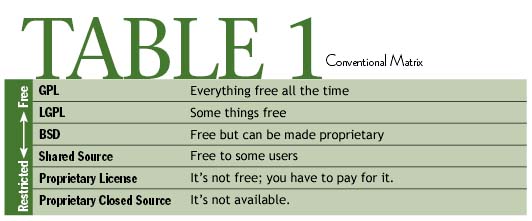
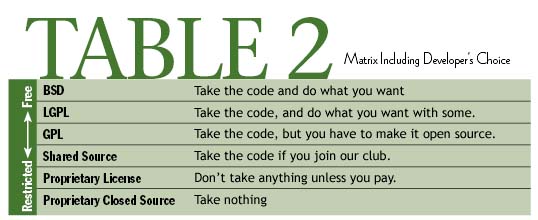
Topics include software development tools, software licensing and open source
issues, managing documentation and creating 'man pages', configuring network
services including email, web, and DNS.
Also covered will be building and configuring custom kernels and kernel modules,
patching and updating the kernel and applications, system and service monitoring
and logging, and basic system security.
Student will gain hands on experience installing, configuring and using
Linux.
Prerequisite: CTS 2301C.”
|
| Objectives: |
"After completing this course, the student will be able to:
- Understand and manage basic system and network security,
including permissions for files and directories,
ACLs (access control lists) and attributes,
SetUID/SetGID, file locking and lock files
- Understand the basics of isolation techniques
(
chroot, BSD jails, and Solaris
zones), hashing, encryption, and digital signatures
- Understand the basic concepts of role-based access
control
- Understand and manage security policies using
sudo,
PAM, and TCP Wrappers
- Use and secure
cron, anacron (and systemd timer units),
and at
- Manage, locate on the Internet, and install documentation;
and create
man pages using nroff
- Understand basic use of development tools: the C compiler,
make, source code management tools
(RCS and Git), using patch, creating
RPM packages, using shared libraries
- Understand software licensing and
issues of open source software
- Understand the concepts of a system kernel, including loading,
booting, RAM disks, and loadable kernel modules
- Understand, install, and upgrade kernel modules and
use kernel patches
- Customize, configure, and install kernels from scratch
(rebuild from source)
- Perform system and service monitoring, using alerting tools, and
understand process accounting and system auditing
- Understand, manage, and configure system logging, log file
rotation, securing log data, using a central loghost,
integrating logs from Windows, and using logs
- Understand basic system tuning
- Understand processes, threads and SMP (multiple core
CPUs), and manage processes (create,
monitor, control, and
kill)
- Understand networking and TCP/IP basics
(addressing, port numbers, RPC)
- Configure basic DHCP and static IP
configuration, and use trouble-shooting tools
- Setup, configure, and troubleshoot common problems for basic
DNS services, including configuring the
resolver,
/etc/hosts and other files,
configuring a caching-only name server, and using DNS
related tools such as dig, nslookup,
and whois
- Understand and configure email services, including mail server,
POP/IMAP, web mail, mailing lists, email aliases, and virus
and spam control
- Setup and configure time, time zones, locales, and using
NTP
- Understand (including hardware requirements), manage, and configure
basic Apache web services"
|
| Prerequisite: |
CTS–2301C
(Unix/Linux Administration I)
or permission of the instructor.
(Also recommended is
COP-2344 (Shell Scripting).)
Students enrolled in a degree or college credit certificate
program must complete all prerequisites.
Note!
Be certain you have all required prerequisites or you won't have
much of a chance of success.
Also you may be dropped from the class.
|
| Facilities: |
YborStudent.hccfl.edu (a Linux server) can be accessed from
on or off campus and can be used to practice, examine configuration files,
read man pages, and do some parts of some assignments.
From off-campus you can also practice using any Unix/Linux system available
(or install Linux at home).
A class “wiki” has been set up for your use, at
YborStudent.hccfl.edu/UnixWiki/.
To add or modify any content you must create a login for yourself.
You can use this wiki to hold discussions, ask questions, and contribute
information to the collaborative study guide.
You will need your own flash disk (preferably USB-3 compliant),
writing materials, and Scantron 882–E or 882–ES
forms.
You can use HawkNet
(WebAdvisor) to obtain your final grade for the course.
You can use your assigned Hawkmail (Hawkmail365) or Canvas email address if
you wish to discuss your grades via email.
(Note, it may be possible to setup your Hawkmail account to forward all
received emails to some outside email account, but you still must send mail
from Hawkmail or Canvas to discuss grades.)
Most college systems use a single sign-on user ID,
known as HCC “NetID”.
Visit netid.hccfl.edu
to register and to update your credentials.
(Your initial password is your uppercase first name initial, lowercase
last name initial, and your seven digit student ID
number.)
Note, the quickest way to resolve login issues is the HCC
Live Web Portal (hcclive.hccfl.edu).
The college provides wireless network connections for students and guests
on Dale Mabry campus.
For students, select the network
“HCC_Wireless” from the list of
available networks.
Follow the on-screen steps by entering your HCC email address and
network password.
For HCC guests: Select
“HCC_Guest”
from available networks.
Follow the on-screen steps to complete registration.
This network will be available between 7:00 AM
and 10:00 PM.
These are the only official HCC networks; don't use others that
may appear.
Hawk Alert text messaging service allows you to receive
important information regarding campus closures or emergencies.
You may also sign up for financial aid notifications and
registration and payment deadlines.
This is a free service, although some fees may be applied by your
cellular service provider or plan for text messages.
To sign up, or for more information, visit
www.hccfl.edu/hawkalert/.
HCC's Student Assistance Program (SAP)
offers resources tailored to student life, providing you with the right tools
to help you through some of life's toughest challenges.
The college has contracted Baycare Health Management to provide free,
professional, confidential counseling by telephone and in person.
A wide range of topics may be addressed through this program, including
mental health counseling, budgeting, and financial concerns.
Please call 800-878-5470 or send email to baycaresap@baycare.org for
further information.
HCC DM Open Lab
CLOSED FOR THE SUMMER DUE TO COVID-19
Computers with PuTTY installed are located in the computer science
department open lab in DTEC–462.
Additionally, there are several computers in there identical with the ones
in our classroom, so you can use your removable hard drive.
Lab hours are:
| Monday – Thursday | 8:00 AM
to 10:00 PM |
| Friday | 8:00 AM to 4:30
PM |
| Saturday | 8:00 AM to 2:30
PM |
(Note: Lab technicians (“Lab Techs”) are not teaching
assistants or tutors, and shouldn't be expected to help you with your
coursework.)
Rules for Using HCC Facilities
- No food or drinks near computer equipment.
- Students bringing their own laptops need to use the wireless network only.
Students cannot disconnect network cables from classroom's computers
to connect their personal devices.
- Students are not allowed to disconnect monitors or computers to power
their personal equipment.
|
| Grading: |
| Projects (about 8): |
50% |
|---|
| 3 equally weighted
closed-book multiple choice exams |
50% |
|---|
| Wiki
(class study guide) extra-credit |
+5 |
|---|
| Classroom
participation: |
+5 |
|---|
Grading scale:
A=90-100, B=80-89, C=70-79, D=65-69, F=0-64
(Or you can elect to "audit" the class during the add/drop period.)
(Collaborating on the class wiki counts as up to 5 points extra credit,
as does active class participation.
See below for details.)
|
| Policies: |
-
Course format is interactive lecture via Zoom,
with most projects done outside of class.
Any student can request that a given lecture be recorded,
as long as they ask before the class starts.
-
Exams will be taken via Canvas, outside of normal class meeting times.
-
No make-up exams will be offered without the prior approval of the
instructor.
If a make-up exam is offered, you can take the exam in my office
during my regular office hours, or from the
Dale Mabry Testing Center.
(Check for their hours of operation, and make sure to give yourself
sufficient time to complete an exam.
You will need to make
an appointment to schedule a make-up exam.)
-
Exams will be closed book and closed note multiple choice exams.
While the exams are non-cumulative, each does build upon knowledge
acquired earlier.
Exams are based mostly upon material presented in class,
however some questions may be from assigned readings (the textbook
and on-line resources).
-
Exams will never cover material not yet discussed in class or assigned in
the readings.
Should the class fall behind the course schedule,
some topics shown on the syllabus due for an earlier exam will be
tested on the following exam instead.
-
The schedule for the final week of the term may cause a conflict
between our class schedule and another class's final exam.
It is up to you to determine if you will have a conflict, and to
bring it to the attention of your instructor, so that appropriate
arrangements can be made.
-
Regular attendance is imperative for the successful completion of
this class.
The textbook and on-line resources should be considered as required
course supplements; in other words the course is not based on
the text.
-
All phones, pagers, and beepers must be turned off during class time,
except with prior permission of the instructor.
No food or drink is permitted in HCC classrooms.
-
Attendance will be taken within 5 minutes of the start of class; after
4 absences and/or lateness, the student will lose 2 points off the
final grade for each additional occurrence.
-
If you miss a class you are still responsible for the material covered
in that class.
All students should exchange contact information (name, email
address, phone number) with at least one other student in the
class.
If you must miss a class, you should then contact another student and
request they take class notes for you.
(Note, Hawknet has Hawkmail365 email for HCC students.)
-
Credit for class participation includes attendance, preparedness,
and adding to class discussions by asking questions and participating
in discussions.
Playing computer games, surfing the Internet, or working on assignments
for this or other classes during class time will lose you credit.
-
Additional time outside of class will be required.
For typical students an average of between 6 and 10 hours each week
outside of class are required for preparation, practice, and projects.
Note some projects will require you to complete them from our
classroom (or the open lab).
-
Students are expected to prepare for each class by completing all
reading assignments,
reviewing examples and model solutions provided, and practicing
outside of class.
This is important — you can't learn a skill such as system
administration only by attending class and reading books.
You must practice several hours a few days each week!
If you won't have enough time available, consider auditing the
course.
-
Students are expected to check the class website regularly.
Any syllabus changes, class cancellations, project assignments,
and homework assignments are announced in class and posted to the
website and via other means, such as Canvas announcements or via the
RSS feed for this class.
-
A student shall not, without my express authorization, make or receive
any recording, including but not limited to audio and video recordings,
of any class, co-curricular meeting, organizational meeting, or meeting
with me.
Further you do not have my permission to post on the web or otherwise
distribute my class lectures and other course materials.
(You can distribute freely any materials I make publicly available from
the HCC (or the wpollock.com) website, without asking
permission, provided you give me credit for the work and don't alter it.
Any other use will require expressly given permission.
-
Working together on individual assignments is considered as
cheating!
Turning in someone else's work without giving them credit is also
considered cheating
(plagiarism).
Cheating will result in an automatic F (zero) for the
project for all parties.
Note that some projects may be group projects, where each member of
a small group works together on a project.
It is also OK to ask a fellow student for class
notes (in the event you miss a class) or for help in understanding
the text or material given to the class (e.g., examples on the
class website).
It is encouraged to study together as well.
-
Because you can learn a lot from your peers, both in the class and
in the broader community, I encourage collaboration with both.
However, do not mistake this as a license to cheat.
It is one thing to learn from and with your peers; it is another to pass
their work off as your own.
With respect to assignments for this class:
- You are expected to document any collaboration that takes place.
- Absolutely no electronic transfer (or other copying) of code between
students is permitted.
- Any code (shell commands) that you “find” on the Internet
must be cited, with an active link to that code.
- While you are encouraged to engage in conversations in online forums,
under no circumstances are you permitted to solicit other individuals to
complete your work for you.
(So, no posting assignments or homework questions and asking for answers.)
- Ultimately, YOU are responsible for all aspects of your
submissions.
Failure to be able to explain and defend your submission will be treated as a
violation of academic integrity.
-
You must abide by the
HCC Acceptable Use Policy (AUP) for
computers and services.
In particular, you must not run network scanners, or attempt to
obtain administrator (“root”) privileges or otherwise
disrupt HCC computers and services.
In some explicitly stated circumstances, some parts of the
AUP may not apply.
If in any doubt, ask!
-
You must follow the academic honesty policy and the
student code of conduct for HCC.
A second cheating offense will result in an “F”
for the course, and your name will be turned over to the dean for
further handling.
I take these matters very seriously.
You have been warned!
-
Every effort will be made to stick to the weekly schedule for
our course.
However it may happen that we will fall behind the schedule at
some point.
If so, no topics will be skipped.
Instead we will attempt to catch up over the following weeks.
-
Please be aware that if we fall behind on the weekly schedule,
the topics discussed may not match what shows on the syllabus.
The weekly schedule may (but probably won't be) updated in this
case.
-
In case we do fall behind, projects and exams will not be automatically
postponed.
Should your instructor deem it necessary, projects and exams may be
rescheduled; this will be announced in class and via other means.
- Communications Policy:
I will respond to your emails within 48 hours or two business
days.
HCC policy is that grades can only be discussed in person
during office hours, or via email only if you use your assigned
HCC HawkNet (Hawkmail365) email account.
-
No appointment is necessary to see me during my scheduled, on-campus
office hours.
You can just “walk-in”.
You can make appointments for other times as long as I'm available.
-
Occasionally my office hours will be canceled on short
(or no) notice, for example if the dean calls me for a meeting.
Before driving out to campus just for my office hours, you can contact
me the night before to make sure I still plan to be there.
-
Late Policies:
Late assignments (homework assignments, projects, or exams)
generally will not be accepted.
An assignment is late if not turned in by the start of class
on the day it is due.
Late assignments will be accepted late only if
you obtain the instructor's permission prior to the due
date of the assignment, or for a documented serious medical
reason.
All late assignments are subject to a late penalty of
at least one letter grade (10%) regardless of the reason for
the delay.
Assignments later than one week will receive a
more severe late penalty; very late assignments without adequate
excuses will receive a grade of “F” (0).
However if you have a very good reason your instructor
may waive any or all of the late penalty.
(Examples of good reasons include extended illness that prevents
working, or being out of town for work reasons.
Remember documentation will be required.)
-
The dangers of the flu or another contagious
disease require some changes to normal policies.
HCC is implementing the
recommendations for institutions of higher learning
of the
CDC.
(See
www.cdc.gov/h1n1flu/guidance/ and
www.flu.gov/ for
guidance from the CDC.)
You won't need documentation if you miss class due to
the flu.
(But if you think you have the flu, you should see a doctor
as soon as you can.)
In the unlikely event of a school closure due to the flu,
some plan to make up the missed work will be made.
If you think you have the flu, stay home.
Do not come to HCC until 48 hours after your
fever has broken as you are still infectious.
Also, people are infectious to others for a day or so before
they have any symptoms.
Flu is spread by touching doorknobs, computer keyboards,
railings on stairs, etc., that were touched by someone
with the flu.
Avoid shaking hands; use the “fist shake” (touching of fists)
if you must use a physical greeting.
The most effective way to avoid catching the flu is
to wash your hands frequently, especially after touching
something that was touched by others.
Avoid unnecessary touching of eyes, nose and mouth.
While not as good as properly washing hands, hand sanitizers
have been installed throughout the campus;
use them often.
|
|---|
|
Projects: |
Projects will be due at various times.
You will have sufficient time to complete the projects,
usually at least a week.
You typically work on the projects
outside of regular class hours.
Note you can work on projects whenever you have time; you don't have to wait to start one.
You may work together in small groups (2 or 3 students) on projects,
provided the names of all who worked together are listed
on each student's submission.
Each student must still submit their own copy of the assignment.
There is no requirement that you re-install your system; you
are permitted to continue using the same disk as for Administration
I, if it it available.
However, you are encouraged to install it again,
especially if that system is unstable.
In any case, there is an Install project you must submit.
You will need to have Fedora 31 available for you to use as administrator.
Most students will use a virtual machine (such as VirtualBox) to set this up on
their home PC (or laptop), but you can set up a dual-boot machine
or use an older PC/laptop and simply install Linux on it.
(See project #1 for more details.)
Projects are graded on the following scale:
A = 95% (Excellent: Good design with good comments, style, and extras)
B = 85% (Good: Good design, some comments, readable style,
and it works)
C = 75% (Acceptable: Project objectives are met or are close to
being met)
D = 65% (Unacceptable)
E = 10-64% (Variable credit: At least you tried)
F = 0% (Didn't hand in the project)
Minor extras worth +5 points, minor omissions or poor design worth -5.
Projects are not graded when turned in.
They are graded all at once, sometime after the project deadline has
passed (usually the next weekend).
(See also submitting assignments below.)
|
|---|
Wiki
Assignment: |
Extra credit can be earned by updating the study guide on the
class wiki
with a substantial contribution based on the material covered
in class, from assigned readings, or from other resources you
have studied.
A substantial contribution means adding new material,
adding references (links), or elaborating (or correcting) some
previous submission.
You should use
wiki formatting and not HTML formatting when
possible, and be sure to spell-check your work.
The wiki will automatically send your instructor an email for each
update, so there is no need to add your name to your contribution.
Your instructor is the editor and moderator of this study guide
(and for all material posted on this wiki site).
Some time will be given for students to correct postings.
However, in order to ensure an accurate study guide, the instructor may
edit, add to, or remove material posted by students.
Your contributions will be graded based on correctness,
completeness, and clarity.
Note regular posting is required to earn extra credit; one
large post the last week of the term will not earn much (if
any) extra credit.
|
|
Submitting Projects: |
Projects can be submitted by email to
.
Please use a subject such as
“Unix/Linux Admin II Project #1 Submission”
so I can tell which emails are submitted work.
Send only one assignment per email message.
Email your projects by copy-and-paste into your mail program.
(Please do not send as attachments!)
If possible use the “text” and not the
“HTML” mode of your email program.
Do not send to
wpollock@YborStudent.hccfl.edu as I may not read that
account regularly.
In the event a student submits more than once for the same assignment,
I will ignore all but the last one received up to the deadline.
Assignments submitted after the deadline will not count toward your
grade except as allowed by the course late
policy.
Also, you cannot resubmit an assignment once it has been graded.
If you have an email problem you may turn in a printout instead.
Be sure your name is clearly written on the top of any pages turned
in.
Please staple multiple pages together (at the upper left).
|
Use Canvas drop-boxes (the Assignments tool) to submit your projects.
|

![[Valid RSS]](https://wpollock.com/images/valid-rss.png)