![[Valid RSS]](images/valid-rss.png)
|
||
|
View Course Schedule
Resources (examples and links) Web page: noun. A single, usually hypertext document on the World Wide Web that can incorporate text, graphics, sounds, etc. Website: noun. A connected group of pages on the World Wide Web regarded as a single entity, usually maintained by one person or organization, and devoted to a single topic or several closely related topics. The Internet noun. A global system of interconnected computer networks, that supports many services including the world-wide web, e-mail, instant messaging, file transfer, etc. |
|
| Time & Place: | Ref No. 35760: Orientation period: 1/13/2020–1/22/2020
(No on-campus meetings or fixed meeting times for this course.)
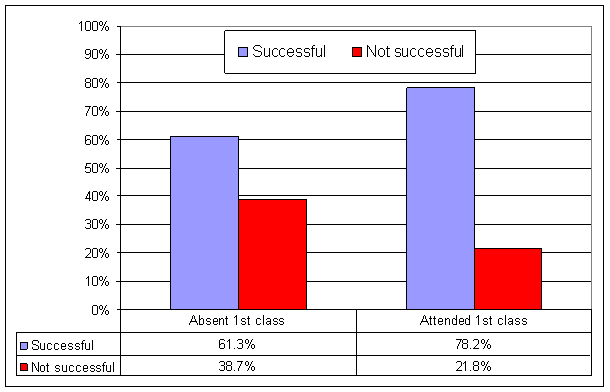
Why is orientation required? (From HCC Absence Study) For this course, you are required to log into Canvas and complete the orientation activities before the end of the orientation period. | ||||||||
|---|---|---|---|---|---|---|---|---|---|
| Instructor: |
Name: Wayne Pollock E-mail: Internet: (Only use if Canvas email is unavailable) Office & Phone: DTEC–404, 253–7213 View my Office Hours.
Skype
ID: wpollock@hccfl.edu
Homepage URL:
https://wpollock.com/
|
||||||||
| Text: | Gary P. Schneider & Jessica Evans,
The Internet Tenth (Comprehensive) Edition,
©2018 Course Technology, Cengage Learning.
ISBN-13: 978-1-337-28390-8,
ISBN-10: 1-337-28390-8.
You must have this exact book for this course.
Note! If you order your book online, you should pay for overnight or second day shipping, not standard shipping which could take more than a week; you shouldn't wait that long! Accessibility and VPAT The Voluntary Product Accessibility Template (VPAT) is a document prepared by vendors that describes the extent to which a particular product is accessible. This course uses learning materials from Cengage.com, and you can find their accessibility and VPAT statements at https://www.cengage.com/accessibility/. | ||||||||
| Description: |
(This is a 3 credit-hour course.)
“An introductory course designed to teach the
basics of navigating the Internet and the World Wide Web
(WWW or simply the Web).
Students participate in online and offline
activities such as accessing the Internet, sending electronic mail,
browsing newsgroups, and completing research activities.
Also discussed is Netequette: acceptable behaviors and
standards of conduct for using the Internet.”
This course is an on-line, distance learning course. There are no required face-to-face meetings. This course uses the Canvas (Canvas) online learning management system. Students are expected to use this system for course information, email, discussion groups, receiving and submitting assignments, taking tests, retrieving grades, and using other class resources. If you need help using the system, see the Canvas resources below. (Your password is your NetID password; see “Facilities” below for details.) Students not completing the mandatory distance learning orientation activities will be withdrawn from the course as a “No Show”, unless prior arrangements are made with the instructor. | ||||||||
| Objectives: | “Upon completion of the course the student should be able to:
| ||||||||
| Prerequisite: | CGS 1000 or permission of the instructor. Students enrolled in a degree or college credit certificate program must complete all prerequisites. Note! HCC registration computers may not check for prerequisites before allowing you to enroll. Be certain you have all required prerequisites or you won't have much of a chance of success. Also you may be dropped from the class. | ||||||||
| Facilities: | All assignments can be performed on any computer that connects
to the Internet.
These include classroom computers and any HCC open
computer lab (on Dale Mabry, room Tech-462), campus library,
public library, and anywhere else with Internet access.
Required software is Microsoft's Internet Explorer, or
some other web browser compatible with Canvas.
(Your browser must support JavaScript, images, and cookies.
Use the “Test your browser” button to verify.)
Any other software needed will be made available.
The college is using a on-line course system, “Canvas”, hosted at hcc.instructure.com (Canvas). You can find tutorials for using the system from the “Help” link on the login page, using the Chat feature with the Help page, or by phoning 844-408-6462 (toll free). Some additional Canvas help links are available in the class resources. Most college systems (including Canvas) use a single sign-on user ID, known as HCC “NetID”. Visit netid.hccfl.edu to register and to update your credentials. (Your initial password is your uppercase first name initial, lowercase last name initial, and your seven digit student ID number.) You will need to register your HCC username, password, and security question(s) before you can use HCC online systems. The quickest way to resolve login issues is the HCC Live Web Portal (hcclive.hccfl.edu). Note that enrollment in our Canvas course is updated automatically, twice a day. Student web sites for this class may be found at http://ftp1.dtecdata.us/YourAssignedAccountName/(Your account name will be assigned once you complete the Web Site Concept project.) Student web sites can be viewed using the class index at: Students may need USB flash drives to save projects backup copies or to submit them from an HCC campus location. You can use HawkNet (WebAdvisor) or Florida Virtual Campus to obtain your final grade for the course. You must use your assigned Hawkmail (Hawkmail365) email address or Canvas Mail if you wish to discuss your grades via email. (Note, it may be possible to setup your Hawkmail account to forward all received emails to some outside email account; but you still must send mail from Hawkmail to discuss grades.)
The college provides wireless network connections for students and guests
on Dale Mabry campus.
For students, select the network
“ Hawk Alert text messaging service allows you to receive important information regarding campus closures or emergencies. You may also sign up for financial aid notifications and registration and payment deadlines. This is a free service, although some fees may be applied by your cellular service provider or plan for text messages. To sign up, or for more information, visit www.hccfl.edu/hawkalert/. HCC's Student Assistance Program (SAP) offers resources tailored to student life, providing you with the right tools to help you through some of life's toughest challenges. The college has contracted Baycare Health Management to provide free, professional, confidential counseling by telephone and in person. A wide range of topics may be addressed through this program, including mental health counseling, budgeting, and financial concerns. Please call 800-878-5470 or send email to baycaresap@baycare.org for further information. Computers are located in the computer science department open lab in DTEC–462. Lab hours are:
| ||||||||
| Grading: |
Grading scale:
A=364-420, B=324-363, C=283-324, D=263-282,
F=0-262 The “My Grades” tool considers any ungraded work to be a zero. This means that until everything is graded, the tool shows you have an “F” in our course, even if you've done well on the taken exams and graded projects! To see how you're doing in our class, you must add up all the points you've earned on graded projects and exams taken, and divide that by the total points you could have earned on those projects and exams. For example, suppose you've taken the first three tests and have received grades for the first three projects, and have earned a total of 110 points for that. Then your estimated grade is 110/(25+25+25+10+20+20), or 88%. | ||||||||
| Policies: |
| ||||||||
| Projects: |
Links to the project assignments can be found in Canvas
Project Descriptions page, and must be submitted using the correct
drop-box in the Canvas “Submit Projects” tool.
(One exception is your web page project, which also must
be uploaded directly to the HCC DM
student web server.
Further details are given in that project's description.)
Different projects are worth different amounts of credit,
depending on the difficulty.
The number of point for each project is shown in the “Submit
Projects” tool.
You will have sufficient time to complete the projects.
Credit, due dates, and project directions are all given in the
individual project descriptions on-line in Canvas.
Feedback comments are sometimes given by your instructor in addition to a grade. You should always check for a comment from your instructor if your grade is not what you expect. Projects are not graded when turned in. They are graded all at once, sometime after the project deadline has passed (usually the following weekend). Every effort will be make to grade projects within a week of the due date, or as soon thereafter as possible. Once submitted, you can't make changes to your project. You will see the project status as “submitted”, until I grade it or return it. (I will return, or “unsubmit”, a project, either on request (if the deadline hasn't passed) or if I can see a serious problem that would result in a near-zero grade. You should read the feedback comment to see why it was returned.) |
| HCC Academic Calendar: | |
|---|---|
| Classes Begin: | Monday 1/13/2020 |
| Add-Drop Ends: | Friday 1/17/2020 |
| Orientation Period Ends: | Wednesday 1/22/2020 |
| Last Day to Withdraw: | Saturday 3/28/2020 |
| Classes End: | Monday 5/11/2020 |
| Grades Available: | Wednesday 5/13/2020 (from HawkNet) |
| HCC is closed on: |
Monday 1/20/2020 (Martin Luther King Jr. Day), Monday 2/17/2020 (Presidents' Day), Monday–Sunday 3/16/2020–3/22/2020 (Mid-Term Break), Tuesday 3/31/2020 (All College Day) Friday–Sunday 4/10/2020–4/12/2020 (Spring Day), |
Dropping or withdrawing may have an impact on financial aid, veteran’s benefits, or international student visa status. Students are encouraged to consult with a financial aid, the VA certifying official, or the international student advisor, as appropriate, prior to dropping or withdrawing from class.
If, to participate in this course, you require an accommodation due to a physical disability or learning impairment, you must contact the Office of Services to Students with Disabilities, Dale Mabry campus: Student Services Building (DSTU) Room 102, voice phone: (813) 259–6035, FAX: (813) 253–7336.
HCC has a religious observance policy that accommodates the religious observance, practices, and beliefs of students. Should students need to miss class or postpone examinations and assignments due to religious observances, they must notify their instructor at least one week prior to a religious observance.
| Quotes: | “Tell me and I'll listen. Show me and I'll understand. Involve me and I'll learn.” | — Lakota Indian saying | |
|---|---|---|---|
| “Learning is not a spectator sport!” | — Chickering & Gamson |
| Due Dates | Topics | Readings to complete |
Chapter Quizzes and Projects to complete |
|---|---|---|---|
| Mon 1/13 |
Start of orientation period: Login and use Canvas. Set email, security question on NetID. Start work on practice project |
Syllabus, Canvas resource links |
Explore Canvas, class web site, and class resources |
| Mon 1/20 | Martin Luther King Jr. Day — HCC Closed | ||
| Wed 1/22 | End of Orientation period. Complete practice use of Canvas | Canvas tutorials |
Practice project Practice quiz, Discussion board posting, Explore Canvas and class web site |
| Mon 1/27 | Basic Internet Concepts: Networks, LANs and WANs, internets and the Internet, TCP/IP, and the WWW (World Wide Web) |
Appendix A, The Internet Revealed (YouTube video) | Appendix A Quiz |
| Mon 2/3 | WWW, hypertext (HTML) and web browsers, URLs | Module 1 |
Module 1 Quiz
ISP Search Project |
| Mon 2/10 | Understanding and using email and related services | Module 2 | Module 2 Quiz |
| Mon 2/17 | Presidents' Day — HCC Closed | ||
| Mon 2/24 | Using search engines effectively, evaluating results | Module 3 | Module 3 Quiz |
| Mon 3/2 | Using libraries and other information sources, understanding copyright issues, multimedia, and types of software and resources (including graphics, audio, and video) | Module 4 |
Module 4 Quiz
Search Engines Project |
| Mon 3/9 | Additional web resources and user-generated content: including RSS, blogs, and social networking | Module 5 | Module 5 Quiz |
|
Mon–Sun 3/16–3/29 | Mid-term Break — HCC Closed | ||
| Mon 3/30 | Creating web (HTML) pages, adding links, using JavaScript (See on-line resources for additional information) |
Module 8,
on-line resources |
Module 8 (!) Quiz
Using Resources Project |
| Mon 3/30 | Creating HTML to display images, downloading and saving files, using Zip to compress/decompress files | Ask your instructor for help with HTML, or stop by my office during my posted hours and we can work on this together. Do NOT wait until the last day to work on the Images project!! | Work on Images project |
| Tue 3/31 | All College Day — HCC Closed to Students | ||
| Mon 4/6 | HTML (continued) | Online, interactive HTML tutorial (from w3schools.com) | Work on Images project |
|
Fri – Sun 4/10–4/12 | Spring Day — HCC Closed | ||
| Mon 4/13 | Using zip, FTP, uploading files | Using FTP (online PowerPoint resource) | Images Project |
| Mon 4/20 | Internet security, including protecting your on-line privacy and reputation | Module 6 |
Module 6 Quiz
Web Page Concept Project |
| Mon 4/27 | Wireless networking and security | Module 7 |
Module 7 Quiz
Scavenger Hunt Project |
| Mon 5/4 | Work on Website project | ||
| Mon 5/4 | Understanding e-commerce, data | Modules 9, 10 |
Module 9 Quiz
Website/FTP Project |
| Mon 5/11 |
Term Ends
Last day to submit any assignments or exams for credit |
Optional Final Quiz Extra-credit Project |
| Resources | |||||
|---|---|---|---|---|---|
| Canvas login page | Canvas home (Select “Canvas”) See also these Canvas quick tips (PDF) | Distance Learning Home | Has several useful Canvas learning links, including Canvas student orientation and a Canvas student guide | ||
| HCC Live Online Support Center | Get help on may topics, including Canvas access information | Canvas Overview Video | Canvas tutorial video (See also this additional Canvas studentguide) | ||
| Canvas guides 1 | One set of Canvas LMS guides for students, faculty, etc. | Canvas guides 2 | Another set of Canvas guides | ||
| How to submit assignments | Canvas tutorial video | How to take a Test | Canvas tutorial video | ||
| How to Check Your Grades | Canvas tutorial video | How to Create a Discussion Board Post | Canvas tutorial video | ||
| HCC Live | Support and help desk | Additional Blackboard.com student resources | Various tutorials (See also the HCC distance learning student resouces) | ||
| Windows Tutorial | A work-in-progress; part 1 shows using the GUI and and file and folder concepts; part 2 shows using the command line | Faculty Expectations for Distance Learning Students | Resources to help students succeed with DL courses | ||
| HCC HawkNet | (also known as WebAdvisor) Find your student ID, change your password, and view your course grades | Reliable Sources (Wikipedia) | An occasionally-updated list of sources showing if they are generally regarded as reliable, unreliable, or blacklisted | ||
| HCC Library resources | Resources for distance learning students | HCC Distance Learning Home | Additional resources for distance learning students | ||
| HCC's bookstore | Locate, browse, or purchase textbooks | ||||
| Wayne Pollock's Website | Home page of Prof. Wayne Pollock | Yahoo Messenger | Get Yahoo Messenger software and more | ||
| CGS-1555 Student website index | A page of links to student web sites on
ftp1.dtecdata.us |
Using FTP | A PowerPoint presentation on how to upload your web site using FTP; You can obtain WinSCP, a good and free FTP client from WinSCP.net (or you can use any other FTP tool you wish, such as FileZilla) | ||
| Netiquette Guidelines | Official rules for proper etiquette on the Internet (See also Student Online Protocols) | FAQs | The Internet FAQ Archives | ||
| www.Google.com | Google Internet search engine | groups.google.com | Usenet / Netnews on-line discussion groups (“newsgroups”) | ||
| How to Evaluate the Credibility of a Source | Good advice on evaluating on-line resources (with summary cheat sheet PDF) See also Checking the credibility of a publisher | Specialized Search Engines and Directories | Links to useful search engines, organized by type of query (See also the Webquest list of the most useful search engines and directories) | ||
| The Internet Revealed | A short (about 5 minutes) YouTube video explaining the Internet | Internet undersea cable map | Shows the cables that carry Internet traffic around the world (See also this 2005 map of about 30% of the Internet on Wikipedia) | ||
| Britain's first Internet Connection - TheConversation.com | How Britain got its first internet connection – by the late pioneer who made it happen | ||||
| 15 Google Searching tips | Advanced searching tips for Google (See also Inside Google Search, and Google's list of search tips and tricks) | Copyright Basics video (.wmv) | A short and informative video on copyrights, from the Copyright Clearance Center | ||
| Spot Fake Reviews TheWireCutter.com |
A good short tutorial on not getting fooled (See also the article at WikiHow.com) | FakeSpot.com | Analyzes reviews to see if any are fake | ||
| Basic.htm | A simple, basic HTML page | Snopes.com | Respected fact-checking site, used to spot fake stories | ||
| Basic2.htm | A basic HTML page with some color | BasicCSS.htm | A basic HTML page with some color, using the modern method of style sheets | ||
| Clickable Links | An explanation of clickable links, or “Hyperlinks” | WinZip | Download evaluation (free) version of WinZip (Or you can use 7zip, which is completely free but slightly harder to use) | ||
| Zip Tutorial | A brief tutorial from Microsoft on creating and using zip archives | Windows Zip & Unzip How-To | A (very short) tutorial from Microsoft on using Zip on Windows 8 (See also this video tutorial from Microsoft on using Zip folders for Windows 7) | ||
| BasicImg.htm | A demo of HTML documents with images | WikiMedia Commons | A collection of free images and other media you can download and use (See also shorpy.com for a nice collection of vintage photographs) | ||
| PublicDomainReview.org | A list of many types of public domain media: images, books, films, and audio (See also Project Gutenberg for many free ebooks) | ||||
| Newsgrounds.com | Some publicly downloadable Flash-based movies and games, and other media | Flickr.com | A collection of free photos you can use. (See also ImageCodr.org for a useful way to check the license and generate the HTML needed to include a Flickr.com image) | ||
| USF Open Use Media Resources | A list of sites where you can find freely-usable images and other media, from USF's library | Copyright Handout for Students (PDF) | A brief guide to copyright, from USF's library | ||
| Clock | A basic HTML page with a JavaScript clock button | The JavaScript Source | A collection of free, ready to use JavaScripts | ||
| BasicVideo.htm | An HTML page showing how to embed videos in a web page (remember to “view source” to see the HTML tags used) | Giphy.com | A search engine for GIFs (including animated ones) (See also Tenor.com) | ||
| W3Schools.com | A collection of tutorials on HTML and related technologies | List of tags | Official HTML 4.01 list of tags | ||
| W3Schools.com - URL encoding | A reference for URL (or percent) encoding | w3.org | The home of the World wide web consortium
(formally w3c.org) |
||
| CSS Tutorial | Cascading Style Sheets 3 Guide (See also CSS Reference) | DIVided we Fall | A web browser game to teach HTML and CSS | ||
| About ping | The real story of the ping utility |
Troubleshooting Web Pages | How to work around some common web page issues with FTP, character encoding, and fonts | ||
| RFC-2504 | Users' Security Handbook | consumer.ftc.gov | Basic online safety information from the FTC (See also StaySafeOnline.org) | ||
| Journalist's Toolbox | A good list of privacy and other security tools, presented for professional journalists but usable by anyone | ||||
| Security tutorial | Tutorial on security and public-key encryption, from Netscape.com's DevEdge site (from the Internet Archive) | Secure Yourself & Your Family | Collection of tips on keeping you safe on-line, from cisa.gov | ||
| Network security tutorial | Tutorial on Internet security from iec.org, now available from The Internet Archive, and based in part on RFC 2196 | Home networking security tutorial | Tutorial on securing your home computer from cert.org | ||